
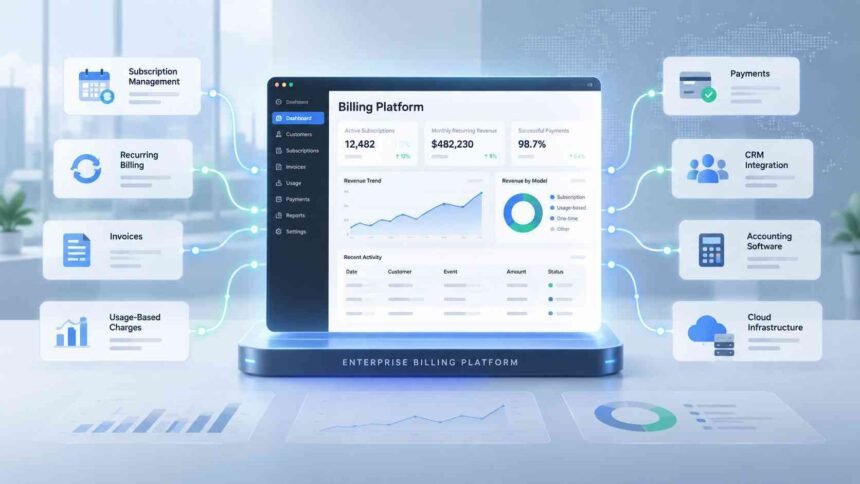
As businesses grow, billing can become much more complicated than sending invoices and collecting payments. Companies may have multiple pricing models, recurring subscriptions, usage-based charges, different currencies, contract changes, and several systems that need to stay synchronized.
Enterprise billing software is designed to manage that complexity. Instead of treating billing as a standalone invoicing task, enterprise billing systems can connect pricing, subscriptions, usage, invoicing, payments, revenue processes, and financial reporting into a more coordinated workflow.
For SaaS companies in particular, the need becomes more pronounced as customer numbers and pricing structures grow. A business may need to handle monthly and annual subscriptions alongside usage charges, upgrades, downgrades, credits, renewals, and other contract changes.
This guide explains what enterprise billing software does, how it differs from basic billing tools, which capabilities matter most, and how businesses can evaluate a solution.
What Is Enterprise Billing Software?
Enterprise billing software is a system built to manage complex billing operations at scale.
Basic invoicing software may be sufficient when a business has a relatively small number of straightforward transactions. Enterprise environments are different. Billing may involve thousands or millions of transactions, multiple products or business units, international customers, several currencies, and a mixture of recurring, one-time, and usage-based charges.
An enterprise billing platform typically sits between commercial systems and financial operations. It can take information about a customer’s contract, subscription, pricing plan, or usage and turn that information into charges, invoices, payment activity, and downstream financial data.
For example, a software company could charge a customer:
- A recurring platform subscription
- A one-time implementation fee
- A per-user charge
- Usage-based fees
- Additional services
- Taxes or other applicable charges
Rather than managing each component separately, an enterprise billing system can apply the relevant billing rules according to the customer’s agreement.
How Enterprise Billing Systems Work
Although implementations vary, the basic workflow usually follows the customer’s commercial lifecycle.
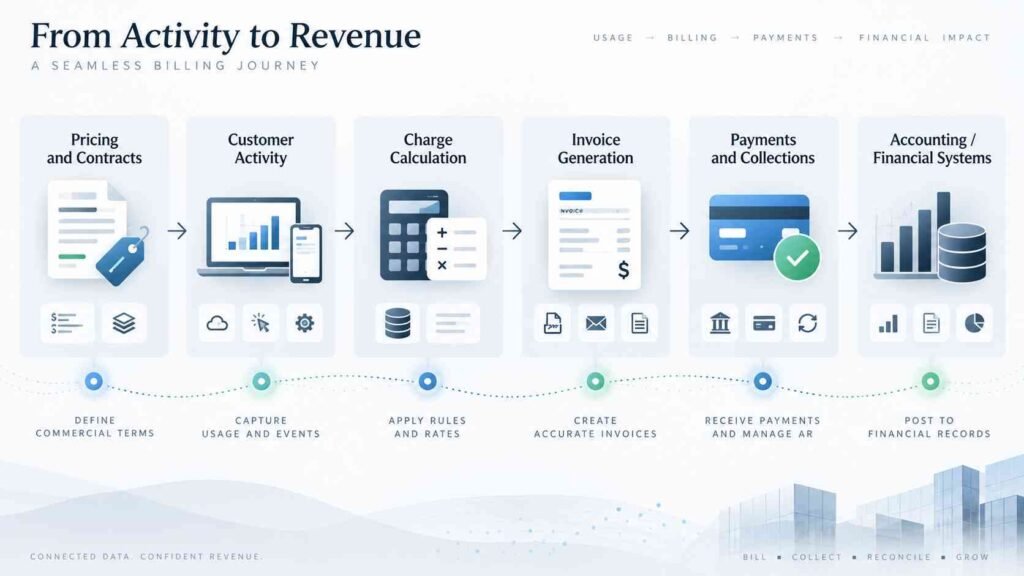
1. Pricing and Contracts Are Defined
The business establishes its products, plans, pricing rules, discounts, billing periods, and contract terms.
For enterprise customers, pricing may be negotiated rather than selected from a standard pricing page. The billing system therefore needs enough flexibility to represent individual agreements.
2. Customer Activity Is Captured
The system receives information about subscriptions, purchases, renewals, or product usage.
Usage-based businesses may need to process consumption data before determining what a customer owes. This can be particularly important for software, telecommunications, cloud services, and other businesses where the final charge depends on actual usage.
3. Charges Are Calculated
The billing engine applies the relevant pricing rules.
Depending on the business model, this could include flat-rate subscriptions, tiered pricing, volume pricing, overage charges, usage-based fees, or combinations of recurring and consumption-based charges.
4. Invoices Are Generated
Once charges have been calculated, the platform generates invoices according to the customer’s billing schedule and contract terms.
Automation can reduce the amount of manual work involved in recurring invoicing and help maintain consistency across a large customer base.
5. Payments and Collections Are Managed
Billing does not end when an invoice is created. Enterprise workflows may also include payment processing, failed-payment handling, retries, reminders, and collections processes.
6. Financial Data Moves Into Other Systems
Billing information may need to flow into accounting software, an ERP, CRM, tax systems, data warehouses, and reporting tools.
This integration layer is particularly important because billing rarely operates in isolation inside a large organization.
Key Features to Look For
Not every business needs the same billing capabilities. However, several features become increasingly important as billing complexity increases.
Recurring and Subscription Billing
Subscription businesses need billing systems that can automatically manage recurring charges across different billing cycles.
The platform should be able to account for events such as:
- New subscriptions
- Renewals
- Upgrades
- Downgrades
- Cancellations
- Prorated charges
- Discounts
- Credits
- Contract changes
This is one reason enterprise billing software is different from simple invoice-generation tools. The system has to understand the lifecycle of the customer relationship, not just produce an invoice.
Usage-Based Billing
Some companies charge customers according to consumption rather than a fixed subscription.
Examples can include:
- API calls
- Storage consumed
- Computing resources
- Transactions
- Data processed
- Seats or active users
- Other measurable units
A capable billing platform can collect usage information, apply pricing rules, and translate consumption into billable charges.
This becomes increasingly relevant as businesses experiment with consumption-based and hybrid pricing models.
Flexible Pricing Models
Enterprise customers often require more flexibility than a simple monthly or annual plan.
A billing system may need to support:
- Flat-rate pricing
- Per-seat pricing
- Tiered pricing
- Volume pricing
- Metered usage
- Minimum commitments
- One-time charges
- Discounts
- Bundles
- Hybrid pricing
The ability to change pricing without rebuilding the entire billing process can also matter as a company introduces new products or experiments with different monetization models.
Recurring Revenue Management
For subscription businesses, billing data is closely connected to recurring revenue management.
The billing system can provide information about recurring charges, renewals, expansions, contractions, cancellations, and other changes in customer contracts.
That information can help finance and business teams understand how recurring revenue is changing over time.
However, businesses should distinguish between billing, cash collection, and revenue recognition. They are related but not identical financial processes.
Revenue Recognition
Revenue recognition is particularly important for SaaS businesses with annual contracts, upfront payments, multiple performance obligations, or other complex arrangements.
Under frameworks such as ASC 606 and IFRS 15, revenue generally needs to be recognized when the relevant performance obligations are satisfied rather than simply when an invoice is issued or cash is received.
Consider a simplified example.
A SaaS company sells a one-year subscription for $12,000 and receives the entire payment upfront. The company has received $12,000 in cash, but that does not necessarily mean it has earned $12,000 of revenue on the first day. If the service is provided evenly throughout the year, revenue may instead be recognized over the service period.
This distinction is why billing and accounting systems need to work together.
CRM Integration
CRM integration can connect customer and contract information with billing activity.
For example, when a sales team closes a new contract, the relevant customer, product, pricing, and contract information may need to reach the billing system. Likewise, sales and account-management teams may need visibility into subscription status, invoices, or payment issues.
This is particularly useful when a business has a complex quote-to-cash process involving sales, contracts, billing, payments, and finance.
A well-integrated setup can reduce manual data entry and limit discrepancies between what sales sold and what finance ultimately billed.
Accounting and ERP Integration
Billing systems generate financial information that accounting teams need to use elsewhere.
Integration with an ERP or accounting platform can help transfer information such as invoices, payments, credits, and revenue-related data into financial workflows.
This does not mean billing software should automatically replace accounting software for SaaS companies. Instead, the two systems often serve different purposes.
Billing determines what customers owe based on commercial terms.
Accounting records financial transactions and supports broader financial reporting.
Revenue management addresses when revenue should be recognized under the applicable accounting framework.
Connecting these functions can give finance teams a more consistent view of the customer-to-cash process.
Enterprise Billing Software vs. Basic Invoicing Software
The difference is largely about complexity and scale.
| Capability | Basic Invoicing Software | Enterprise Billing Software |
|---|---|---|
| Simple invoices | Yes | Yes |
| Recurring billing | Often | Yes |
| Complex subscriptions | Limited | Strong support |
| Usage-based pricing | Limited or unavailable | Common |
| Multiple pricing models | Limited | Flexible |
| Contract changes | Basic | Advanced |
| CRM integration | Sometimes | Common |
| ERP/accounting integration | Sometimes | Important capability |
| Multi-currency operations | Varies | Common requirement |
| High transaction volumes | Limited | Designed for scale |
| Revenue workflows | Limited | More advanced |
| Complex enterprise accounts | Limited | Designed for them |
A small business with straightforward invoices may gain little from an enterprise platform. The additional functionality becomes more valuable when billing complexity starts creating operational problems.
Why SaaS Companies Need More Than Traditional Accounting Software
SaaS businesses have billing requirements that traditional accounting workflows may not handle efficiently on their own.
A SaaS company could have thousands of customers on different plans, each with different renewal dates, discounts, usage levels, contract terms, and payment arrangements.
That creates a distinction between SaaS accounting software and dedicated billing infrastructure.
SaaS accounting software can support financial reporting, general ledger activity, accounts receivable, and other accounting functions. But subscription billing requires another layer of logic around products, plans, entitlements, usage, renewals, pricing, and customer contracts.
Revenue recognition adds another layer because the timing of an invoice and the timing of recognized revenue can differ.
For this reason, growing SaaS businesses often need billing and accounting systems that integrate rather than expecting one application to perform every function.
Cloud Billing Solutions and Enterprise Operations
A cloud billing solution allows billing capabilities to be delivered through cloud infrastructure rather than relying exclusively on locally hosted software.
Cloud based billing solutions can be attractive to organizations that want easier access across locations, integration through APIs, and infrastructure that can scale with transaction volumes.
However, “cloud-based” by itself does not make a billing platform suitable for enterprise use.
Businesses should still examine:
- Integration capabilities
- Security controls
- Reliability
- Data handling
- Compliance requirements
- Scalability
- API availability
- Administrative controls
- Reporting
- Support and implementation
- Data migration options
The underlying architecture matters, but the practical question is whether the system can reliably support the organization’s billing model and operational requirements.
Benefits of Enterprise Billing Software
Less Manual Billing Work
Automating recurring invoices, usage calculations, payment workflows, and other repetitive processes can reduce the amount of manual work required from finance and operations teams.
Similar automation principles can also be applied to accounts payable and invoice processing, where digital workflows can reduce manual handling of invoices, approvals, and payments.
Fewer Billing Errors
Automated rules can apply pricing and contract terms consistently. This can be especially valuable when a business has many customers with different billing arrangements.
Better Scalability
A billing process that works for hundreds of customers may become difficult to maintain when the customer base reaches thousands or more.
Enterprise billing infrastructure is designed to handle larger transaction volumes and more complicated customer relationships.
Greater Pricing Flexibility
Businesses can introduce or modify subscription, usage-based, and hybrid pricing models without relying entirely on manual calculations.
Better Visibility Across Teams
Integration with CRM, ERP, accounting, and other systems can give sales, finance, operations, and customer teams access to more consistent information.
Stronger Financial Controls
Automated billing and revenue workflows can create more consistent processes and audit trails, although businesses still need appropriate accounting policies and controls.
When Should a Business Consider Enterprise Billing Software?
There is no single customer count or revenue threshold that determines when a business needs an enterprise billing platform.
The stronger indicators are usually complexity and operational strain.
A business may need to consider enterprise billing software when it is dealing with several of the following:
- Multiple subscription plans
- Usage-based or consumption pricing
- Large numbers of invoices
- Frequent upgrades and downgrades
- Complex enterprise contracts
- Multiple currencies or markets
- Several billing entities
- Increasing payment failures
- Manual reconciliation
- Spreadsheet-heavy billing processes
- Disconnected CRM, billing, and accounting systems
- Difficult month-end revenue processes
- Frequent billing disputes
If finance teams are repeatedly fixing billing data manually or engineering teams are building custom billing logic to compensate for limitations in existing tools, it may be time to evaluate dedicated billing infrastructure.
How to Choose Enterprise Billing Software
The right platform depends on the company’s business model rather than the number of features listed on a vendor’s website.
Start With the Billing Model
First document how customers are actually charged.
Does the business use subscriptions, usage-based pricing, one-time charges, or a combination?
A platform that handles only simple recurring billing may become restrictive if the company plans to introduce consumption-based pricing.
Examine Integration Requirements
Map the systems that billing needs to communicate with.
These may include:
- CRM
- CPQ
- Payment gateways
- Accounting software
- ERP
- Tax systems
- Product databases
- Data warehouses
API availability and integration quality can be just as important as the billing interface itself.
Test Complex Scenarios
A billing platform should be evaluated against real customer scenarios rather than a simple demonstration.
For example, test how it handles:
- Mid-cycle upgrades
- Downgrades
- Credits
- Refunds
- Contract amendments
- Multiple currencies
- Usage charges
- Discounts
- Annual prepaid contracts
- Failed payments
- Cancellations
These situations often reveal limitations that are not obvious during a standard product demo.
Consider Revenue and Accounting Requirements
Finance teams should determine how billing data will connect with revenue recognition and accounting processes.
This is particularly important for SaaS companies operating under ASC 606, IFRS 15, or other applicable accounting requirements.
The billing platform does not eliminate the need for qualified accounting oversight. Instead, it should support the company’s established financial processes.
Evaluate Scalability
Do not assess scalability only by asking how many invoices a system can generate.
Consider the overall workload: customer records, usage events, pricing rules, integrations, reporting, payment processing, and future expansion.
A platform should be able to accommodate the business model the company expects to operate several years from now, not just its current transaction volume.
Common Mistakes to Avoid
Choosing Based Only on Invoice Features
Invoices are only one part of enterprise billing.
A visually polished invoice generator may not be capable of handling complex subscriptions, usage-based pricing, contract modifications, or integrations.
Treating Billing and Accounting as the Same Thing
Billing determines what should be charged. Accounting determines how financial activity is recorded and reported.
Keeping that distinction clear makes system design and implementation easier.
Ignoring Contract Complexity
Enterprise contracts frequently contain negotiated terms that do not fit neatly into standard pricing plans.
A platform should be tested against actual contract structures before a company commits to it.
Building Too Many Custom Workarounds
Customization can be useful, but excessive custom logic can create maintenance problems.
If a business continually has to build external scripts, spreadsheets, or manual processes to make a billing platform work, the long-term cost may outweigh the initial convenience.
Overlooking Implementation
Even capable billing software can fail to deliver its expected benefits if customer data, product catalogs, pricing rules, contracts, payment systems, and accounting workflows are migrated poorly.
Implementation should therefore be treated as part of the software decision, not an afterthought.
The Role of Billing in Modern SaaS Operations
Billing has become more closely connected to the broader commercial and financial infrastructure of SaaS companies.
A customer’s journey can begin in a CRM, move through quoting and contracting, continue into subscription management and billing, and eventually reach payments, accounting, revenue recognition, and financial reporting.
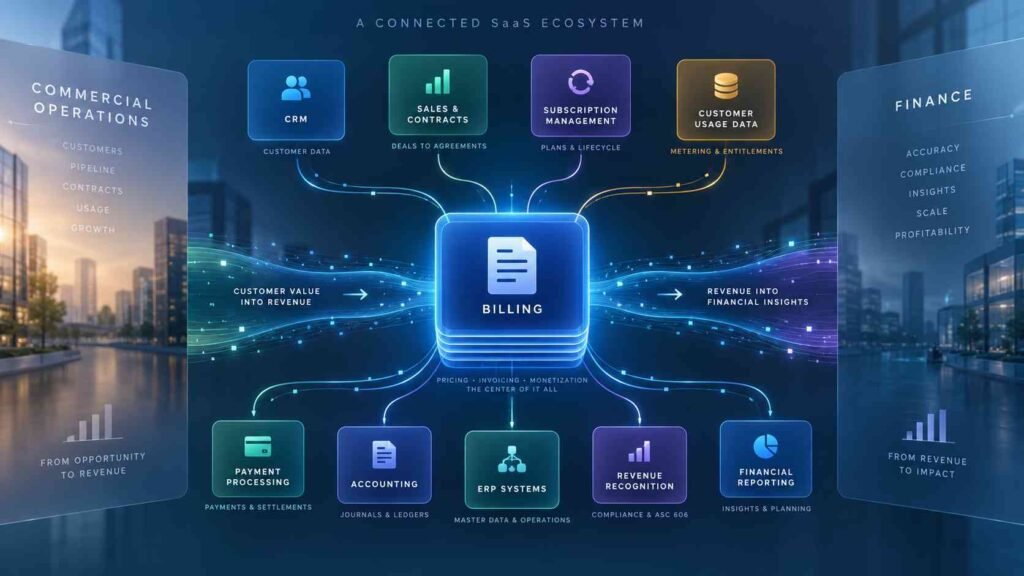
That makes billing more than a back-office invoicing function. It can act as an important connection point between the commercial side of the business and finance.
The trend toward usage-based and hybrid pricing makes that role even more significant. Businesses increasingly need systems capable of translating changing customer activity and contractual terms into accurate charges without creating a large manual workload.
Final Takeaway
Enterprise billing software is most valuable when billing becomes too complex to manage reliably through basic invoicing tools, spreadsheets, or disconnected systems.
The strongest platforms go beyond recurring invoice generation. They can support complex pricing, subscription changes, usage-based charges, payment workflows, CRM and ERP integrations, and the financial processes surrounding recurring revenue.
For SaaS businesses, the distinction between billing, accounting, and revenue recognition is particularly important. The goal is not simply to automate invoices, but to create a reliable flow of information from the customer contract through billing and payment into the company’s financial systems.
When evaluating enterprise billing systems, businesses should therefore focus less on the length of a feature list and more on whether the platform fits their actual pricing model, integrates with their existing infrastructure, handles complex scenarios, and can scale as the business evolves.
This article is for general informational and educational purposes only and does not constitute financial, accounting, legal, tax, or investment advice. Businesses should consult appropriately qualified professionals when making decisions about accounting treatment, compliance, or financial systems.