
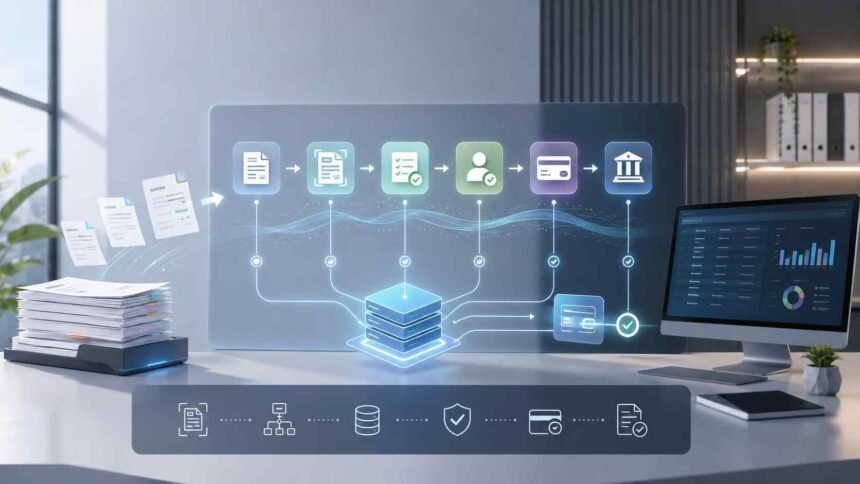
Accounts payable can become difficult to manage when invoices arrive through multiple channels, approvals depend on individual employees, and finance teams still rely on spreadsheets or manual data entry. As invoice volumes grow, these processes can consume time while increasing the risk of errors, delayed payments, and limited visibility into what a business owes.
AP automation addresses these challenges by using software and connected workflows to handle many of the repetitive tasks involved in receiving, processing, approving, and paying invoices.
The benefits of AP automation extend beyond faster invoice processing. A well-designed system can improve accuracy, strengthen financial controls, provide better visibility into cash commitments, and allow accounts payable teams to spend less time on routine administration. Technologies such as optical character recognition (OCR), automated invoice scanning, artificial intelligence, and robotic process automation (RPA) can work together as part of this process.
What Is AP Automation?
AP automation is the use of technology to digitize and automate accounts payable workflows, from invoice capture through approval, payment, and reconciliation.
AP automation is the use of technology to digitize and automate accounts payable workflows, from invoice capture through approval, payment, and reconciliation, bringing financial activities into a more connected digital workflow.
In a traditional AP process, an employee may receive an invoice, enter its information into an accounting or ERP system, check it against a purchase order, send it for approval, arrange payment, and later reconcile the transaction. Each step can involve manual work.
With automation, software can handle many of these activities according to predefined rules. An invoice may be captured electronically, its data extracted automatically, checked against purchase orders or receipts, routed to the appropriate approver, and prepared for payment without requiring someone to manually move information between systems.
The exact level of automation varies. Some businesses may automate invoice capture and approval while keeping payment authorization under human control. Others may automate much of the invoice-to-payment process.
How Does AP Automation Work?
AP automation typically combines several technologies and workflow steps rather than relying on a single tool.
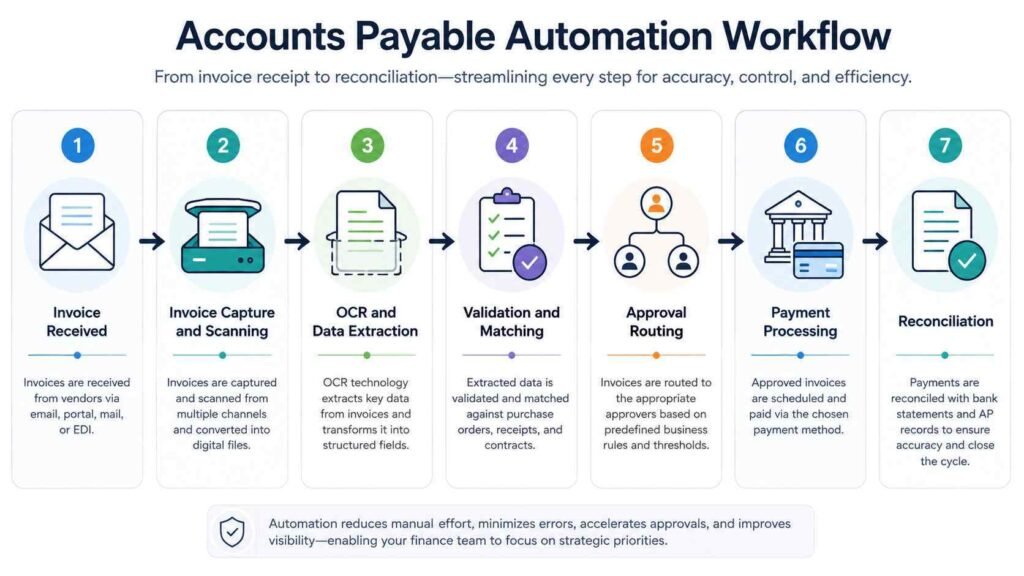
1. Invoice capture
Invoices can arrive as PDFs, email attachments, electronic documents, or paper documents. Automation software collects these invoices and brings them into a centralized workflow.
2. Automated invoice scanning and data extraction
Accounts payable scanning solutions can use OCR to read information from invoices and convert it into structured digital data.
Instead of manually typing the vendor name, invoice number, date, tax information, line items, and total amount, the system can extract these fields automatically.
Modern systems may also use machine learning or other AI-based techniques to interpret different invoice layouts and identify relevant information.
3. Validation and matching
The extracted information can be checked against existing records. For example, a system may compare an invoice with a purchase order and receiving information.
A three-way match generally compares:
- The purchase order
- The supplier invoice
- The receipt or record confirming that goods or services were received
If the information matches the company’s rules, the invoice can continue through the workflow. If something does not match, the system can flag the invoice for human review.
4. Approval routing
Instead of sending invoices manually between employees, automated workflows can determine who needs to approve an invoice based on factors such as amount, department, supplier, or cost center.
This can reduce the time spent chasing approvals and make the process more consistent.
5. Payment processing
Once an invoice has passed the necessary checks and approvals, the system can prepare or schedule payment according to the company’s policies and payment terms.
Human authorization may still be required, particularly for sensitive payment activities.
6. Reconciliation and recordkeeping
Automation can also help match payments with invoices and accounting records. Digital records make it easier for finance teams to track transactions and retrieve documentation when needed.
8 Key AP Automation Benefits
The value of automation depends on the business, its transaction volume, existing systems, and implementation. Still, several benefits are common across well-designed AP workflows.
1. Faster Invoice Processing
Manual invoice processing often requires employees to move information between email, spreadsheets, accounting systems, and approval channels.
Automation reduces the number of manual steps. Invoice information can be captured once and then move through predefined workflows.
That can shorten processing times, particularly when invoices would otherwise sit in shared inboxes or wait for someone to forward them to the correct approver.
Faster processing can also make it easier to pay invoices according to agreed terms and potentially take advantage of legitimate early-payment discounts when available.
2. Fewer Data-Entry Errors
Manual data entry creates opportunities for mistakes, including incorrect invoice numbers, amounts, dates, vendor information, or accounting classifications.
Automated invoice processing reduces the amount of information employees have to enter manually. Validation rules can then check the extracted data before it moves further through the workflow.
Automation does not eliminate errors entirely. Poor source documents, unusual invoice formats, incorrect supplier information, and configuration problems can still require human intervention. The advantage is that routine data handling can be standardized and checked systematically.
3. Lower Administrative Costs
One of the major accounts payable automation benefits is reducing the amount of staff time spent on repetitive activities.
Employees can spend less time:
- Entering invoice information
- Searching for documents
- Chasing approvals
- Checking invoice status
- Matching records manually
- Re-entering payment information
- Performing routine reconciliation
This does not necessarily mean reducing the AP workforce. In many organizations, the greater opportunity is to shift employees toward exception handling, analysis, supplier management, and other tasks that require judgment.
4. Better Visibility Into Cash Commitments
Manual AP processes can make it difficult to see exactly which invoices are pending, approved, overdue, or awaiting payment.
A centralized digital workflow provides a clearer view of outstanding obligations.
Finance teams can use that information to understand upcoming payments, monitor invoice status, and make better-informed cash-management decisions.
This is particularly useful when an organization has invoices coming from many suppliers or multiple business units.
5. Stronger Approval and Financial Controls
Automation can apply consistent rules to invoice approvals.
For example, an organization can require invoices above a certain amount to receive additional approval or route invoices from particular departments to designated employees.
Digital workflows can also create records showing who reviewed or approved a transaction and when the action occurred.
These controls can make processes more consistent and provide useful documentation for internal reviews and audits.
6. Reduced Risk of Duplicate or Incorrect Payments
Duplicate invoices can occur when the same document is submitted more than once or when information is entered into different systems manually.
Automated workflows can check invoice information against existing records and flag potential duplicates or discrepancies.
Other validation rules can identify unusual amounts, missing information, mismatched purchase orders, or other exceptions that require attention.
Automation is therefore useful as a control mechanism, although it should not be treated as a guarantee that fraud or payment errors will never occur.
7. Better Supplier Relationships
Suppliers generally want predictable invoice processing and timely payment.
When invoices are easier to track and approvals move through a consistent workflow, businesses can reduce avoidable delays and improve visibility into payment status.
That can reduce the amount of time AP staff spend responding to basic invoice-status questions while giving suppliers a more predictable experience.
8. Easier Scaling as Invoice Volumes Grow
A manual AP process can become increasingly difficult to manage as a company adds suppliers, employees, locations, and transactions.
Automation allows many routine tasks to be handled through the same digital workflow, making it easier to accommodate higher volumes without increasing manual work at the same rate.
However, scalability still depends on system capacity, integration quality, workflow design, and the complexity of the company’s transactions.
Accounts Payable Automation Using RPA
Robotic process automation (RPA) uses software bots to perform repetitive, rule-based computer tasks.
In accounts payable, RPA can be used for activities such as transferring information between systems, entering data, checking records, updating ERP fields, or performing repetitive validation tasks.
For example, an RPA bot could take information from one business application and enter it into another when those systems do not have a direct integration.
This makes robotic process automation in accounts payable particularly useful for repetitive tasks that follow predictable rules.
However, RPA is only one part of the broader automation picture. OCR can capture information from documents, AI can help interpret and classify data, and workflow automation can manage approvals. An effective AP automation strategy may combine several of these technologies rather than relying on RPA alone.
What Role Do Accounts Payable Scanning Solutions Play?
Accounts payable scanning solutions are designed to convert invoice documents into usable digital information.
Traditional scanning simply creates a digital image of a paper invoice. That is useful for storage, but it does not by itself automate the AP process.
Automated invoice scanning goes further by using OCR and related technologies to identify information within the document.
For example, the system may recognize:
- Supplier name
- Invoice number
- Invoice date
- Purchase order number
- Line-item information
- Tax amounts
- Total amount
- Payment terms
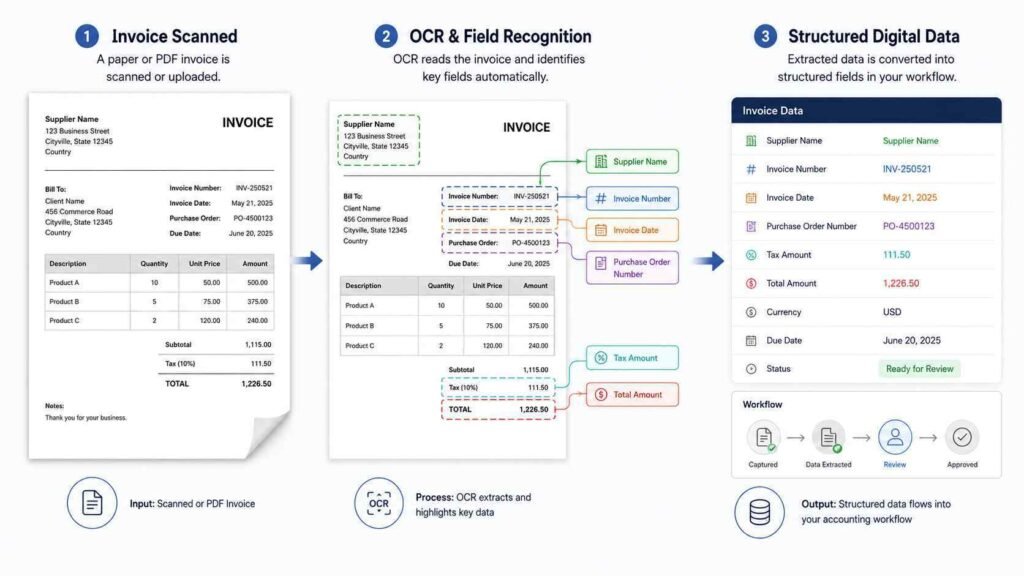
That information can then be passed into the broader invoice workflow.
This distinction matters because invoice automation is broader than scanning. Scanning and data extraction address invoice capture, while full AP automation can extend through validation, matching, approvals, payment, reconciliation, and reporting.
AP Automation vs. Manual Accounts Payable
| Area | Manual AP | Automated AP |
|---|---|---|
| Invoice entry | Employees enter information manually | Data can be captured and extracted automatically |
| Invoice routing | Often handled through email or physical documents | Rules can route invoices automatically |
| Matching | Employees compare records | Systems can perform automated matching |
| Approval | Manual follow-ups may be required | Workflows can route approvals based on rules |
| Status tracking | May require emails or spreadsheets | Centralized digital tracking |
| Error detection | Relies heavily on manual checks | Automated validation can flag exceptions |
| Reconciliation | Often involves manual comparison | Software can automate parts of the process |
| Reporting | Information may be spread across systems | Centralized data can improve visibility |
The table does not mean automation removes humans from accounts payable. Instead, it changes where human attention is needed. Routine transactions can move through automated workflows while employees focus on exceptions and decisions that require judgment.
What Are the Challenges of AP Automation?
The benefits can be significant, but automation is not automatically successful simply because software has been installed.
Businesses should consider several issues before implementing an AP automation system.
Integration
The automation platform needs to work effectively with accounting software, ERP systems, procurement platforms, banking systems, and other relevant tools.
Poor integration can create new manual work rather than eliminate it.
Invoice complexity
Not every invoice follows the same format. Businesses may receive invoices containing unusual layouts, handwritten information, multiple tax treatments, or incomplete purchase-order details.
The system needs a reliable process for sending exceptions to people for review.
Workflow design
Automating an inefficient process does not necessarily make it better.
Businesses should understand how invoices currently move through the organization and identify unnecessary steps before configuring automated workflows.
Security and access controls
Accounts payable involves sensitive financial information and payment activity. Access should therefore be limited according to employees’ responsibilities, with appropriate controls around approvals and payment authorization.
Change management
Employees need to understand how the new process works and what their responsibilities are after automation.
Training is especially important when automation changes approval procedures, invoice submission methods, or exception-handling responsibilities.
Are the Benefits of AP Automation Worth It?
For organizations dealing with significant invoice volumes or inefficient manual processes, AP automation can provide meaningful operational benefits.
The strongest case usually comes from looking at the entire process rather than one task. Automating invoice scanning alone may save data-entry time, but combining automated capture with matching, approval routing, payment workflows, and reconciliation can have a broader effect.
Businesses should evaluate the potential value against implementation costs, integration requirements, transaction volume, existing inefficiencies, and the complexity of their AP processes.
The goal should not be to automate every decision. A better approach is to automate predictable, repetitive work while keeping appropriate human oversight for exceptions, approvals, and higher-risk transactions.
The Bottom Line
The main AP automation benefits come from replacing repetitive manual work with connected digital workflows. Faster invoice processing, fewer data-entry errors, better visibility, stronger controls, easier reconciliation, and improved scalability can all make accounts payable more efficient.
Technologies such as automated invoice scanning, OCR, AI, and RPA can each contribute to that process, but they solve different parts of the problem. The greatest value comes when they are combined into a workflow that fits the organization’s existing financial systems and control requirements.
For finance teams, AP automation is therefore less about removing people from the process and more about giving them better tools to manage the work that actually requires human judgment.
This article is for general informational and educational purposes only and does not constitute financial, accounting, legal, or other professional advice.